The TUI (Terminal User Interface)
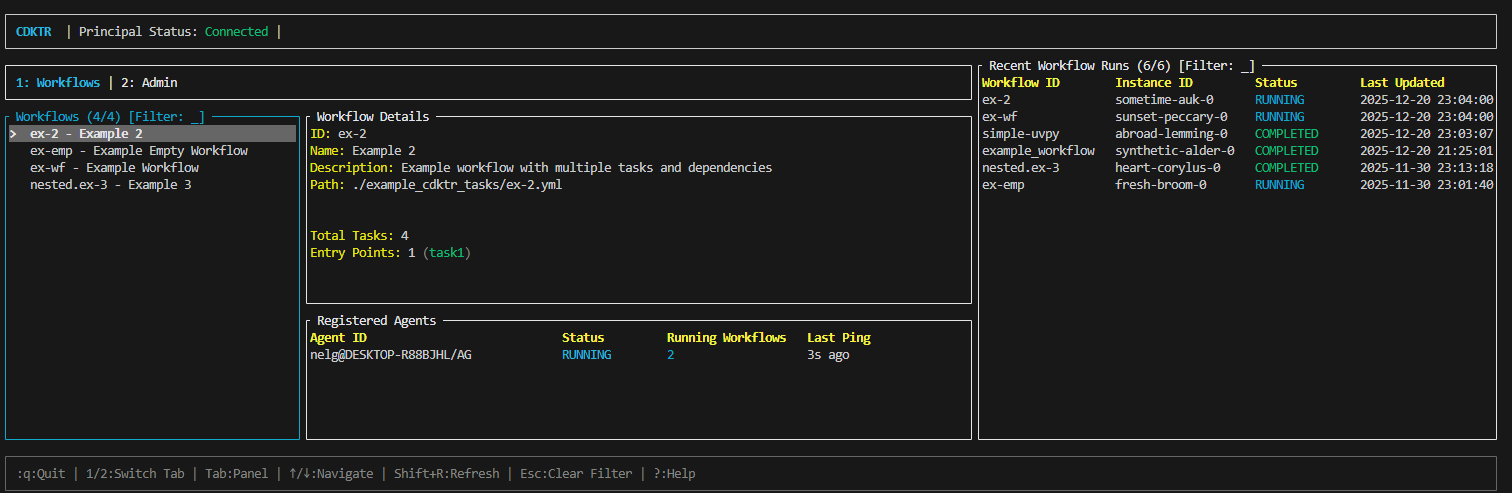
cdktr includes a powerful Terminal User Interface (TUI) built with Ratatui, providing real-time monitoring and management of workflows without requiring a web browser.
Features
- Workflow Management: View all workflows and their schedules
- Real-time Monitoring: Watch workflow execution in real-time
- Agent Status: Monitor registered agents and their health
- Manual Triggers: Run workflows on-demand with a keypress
- Log Viewing: Browse execution logs directly in the terminal
- Keyboard Navigation: Efficient keyboard-driven interface
Launching the TUI
To start the TUI, ensure you have a principal running that you can connect to, then run:
cdktr ui
Quick Navigation
↑↓orjk- Navigate listsr- Run selected workflowq- QuitTab- Switch between panels?- Show help
Sections
- Overview - What the TUI provides
- Navigation - How to navigate
- Workflow Management - Managing workflows
- Monitoring - Viewing execution status
- Agent Management - Agent information